If Enshrouded reaches its menu but hangs on a black screen when you enter a world, install Steam hotfix 1.0.1.2 or later and retry that same world. The 4 November 2026 patch, revision 1287369, fixes an endless black screen that affected entry into certain worlds. If you can see your world in the list, leave the save in place while you check the update.
Install the 4 November hotfix
Close the game and open Downloads in the Steam client. If Enshrouded has an update queued for later, move it to the front of the queue and wait for Steam to finish installing it. Then reopen the game and choose the same character and world you were trying to load. When you reach Embervale, check that you can move your character and that the world you expected has loaded.
Use 1.0.1.2 as the minimum version for this fix. The 21 October hotfix, 1.0.0.3, addressed an earlier endless black screen when loading a multiplayer game. The 4 November fix addresses a separate case when entering certain worlds. If you're joining a dedicated server, ask whoever runs it to check for a server update too, especially if they haven't restarted it since the patch. Arrange a restart with the host so anyone still playing has time to leave.
Check where loading stops
On Steam Deck, give a black screen before the main menu time to clear on the first launch. Keen Games says initial shader preparation can leave the screen black for a minute or two. If the menu appears and the screen goes black only after you pick a world, use the world-loading checks below. If the world never appears in the list, start with the Early Access save carry-over and storage checks.
If the updated game still gets stuck, try opening a different world with the same character. Use a separate world slot if you need to make a test world and keep the original untouched. If the second world opens, record the name of the world that stalls and whether you were playing alone, joining a friend or connecting to a dedicated server. For a shared world, ask whether the host or another player can get in. This gives Keen a specific session to investigate.
Verify the install and report a repeatable hang
If loading stalls in more than one world, check the Steam install. Right-click Enshrouded in your Library, choose Properties, open Installed Files and select Verify integrity of game files. Let Steam finish and download any replacements. Then open the game and retry the original world with the same character. Check whether you reach the world this time, or whether it still stops at the same point. Keep your original saves while you do these checks.
If it still hangs, submit a bug report to Keen Games. Press F1 and choose Report a Bug if you can access the game interface. If you're stuck on the loading screen, open the support form linked in the hotfix notes. Include your game version, where the screen goes black and the result of trying a second world. Include the exact wording of any error message. If only one player in the group gets stuck, say which role they have, such as host or guest.
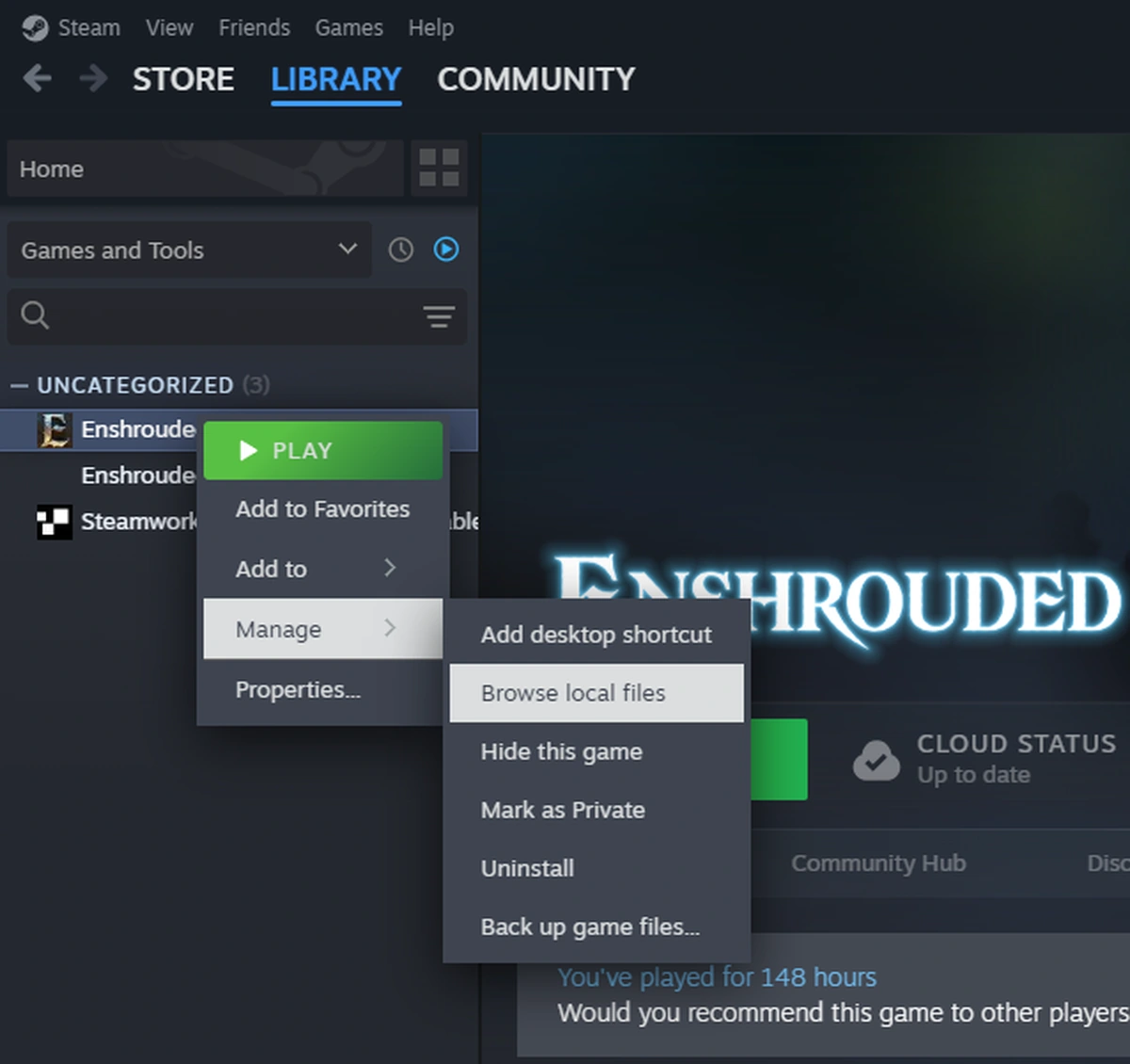
On Windows, right-click Enshrouded in Steam and choose Manage, then Browse local files. The folder that opens contains enshrouded.log and a backup folder with older logs. Zip the log and that folder for your report. Keen also asks for a DxDiag report and relevant save files. For a dedicated server, ask the host to include its logs and a copy of the affected world save with the report.
Sources
Where this story comes from, and where you can check it.
Official sources
- Keen GamesChangelog for Hotfix #5: v1.0.1.2 ↗
- Keen GamesChangelog for Hotfix 1.0.0.3 ↗
- Steam SupportManaging Steam Downloads & Updates ↗
- Steam SupportVerify Integrity of Game Files ↗
- Keen GamesSteam Deck ↗
- Keen GamesReporting Bugs ↗