To trade in Warframe, reach Mastery Rank 2 and meet another player at a Clan Dojo Trading Post or Maroo's Bazaar. Choose your items, check the other player's offer and the Credit tax, then both select Ready and Confirm. You can use another player's Dojo without joining their clan.
This covers ordinary player trades, including the cross-platform rules introduced with Koumei & the Five Fates on 2 October 2024, checked against current instructions on 18 November 2026. Follow the venue steps on PC, PS4, PS5, Xbox One, Xbox Series X|S, Switch and Switch 2. Mobile players use the same trading system.
Check your rank and account first
Use your account's Mastery Rank when checking eligibility. Rank 30 on an individual weapon or Warframe is a different progression track. Reach Mastery Rank 2 before arranging your first exchange; Trading Chat is hidden below that rank in Update 44, released on 23 September 2026. On PC, use our Mastery Rank test instructions when you are ready to advance your account rank.
For PC and Cross Platform Save accounts, enable TennoGuard 2FA. Log into your PC account on the Warframe website, open Account Management and select Enable TennoGuard 2FA. Open the confirmation link sent to your account's email address. Check that you can access that inbox before starting; ask Support for an email change if you have lost access.
Meet at a Dojo or Maroo's Bazaar
Find a buyer or seller through Trading Chat and agree which items you want to exchange. If either of you has access to a Dojo with a Trading Post, meet there. Your partner can invite you through the Friends List or chat, including /invite followed by your name. You can trade with someone who is outside your clan or friends list.
- In the Dojo, approach and use the Trading Post.
- Select your partner from the available players and send the trade request.
- After they accept, select the items you want to offer.
For the public alternative, enter Maroo's Bazaar on Mars. Open Gear, select Set up shop, choose the items you want to display and confirm. You can also approach a player who already has a shop open. Accepting a trade request opens the exchange, where you choose the actual offered items.
Check the offer before confirming
Keep enough Credits for the tax on the items you receive. Read the amount below your profile image in the trading screen: it updates when the offered items change. A clan can add its own tax, so check the displayed total before committing. Your daily trade allowance depends on Mastery Rank; Founders receive two additional trades.
Check each item's exact name and the Platinum amount. Purchased Platinum and Platinum received through trading are eligible; your starting 50 Platinum and promotional rewards are excluded. Prime blueprints and eligible dropped Prime parts can be traded, while Prime parts you craft from blueprints cannot. Keep the exchange within the items available in the trading interface.
Once both offers match your agreement, select Ready, then Confirm. Recheck any changed offer before accepting again. You can cancel before completion; completed trades cannot be reversed. The trade completes after both confirmations, and its Credit tax is deducted. If your game crashes mid-trade, your partner is notified and you can resume later.
Trade with someone on another platform
Enable Cross Platform Play in your in-game settings when your partner uses another platform. Cross Platform Save linking is optional for trading: the October 2024 update removed the matching-account-status requirement. Keep the PC and Cross Platform Save 2FA requirement above in mind.
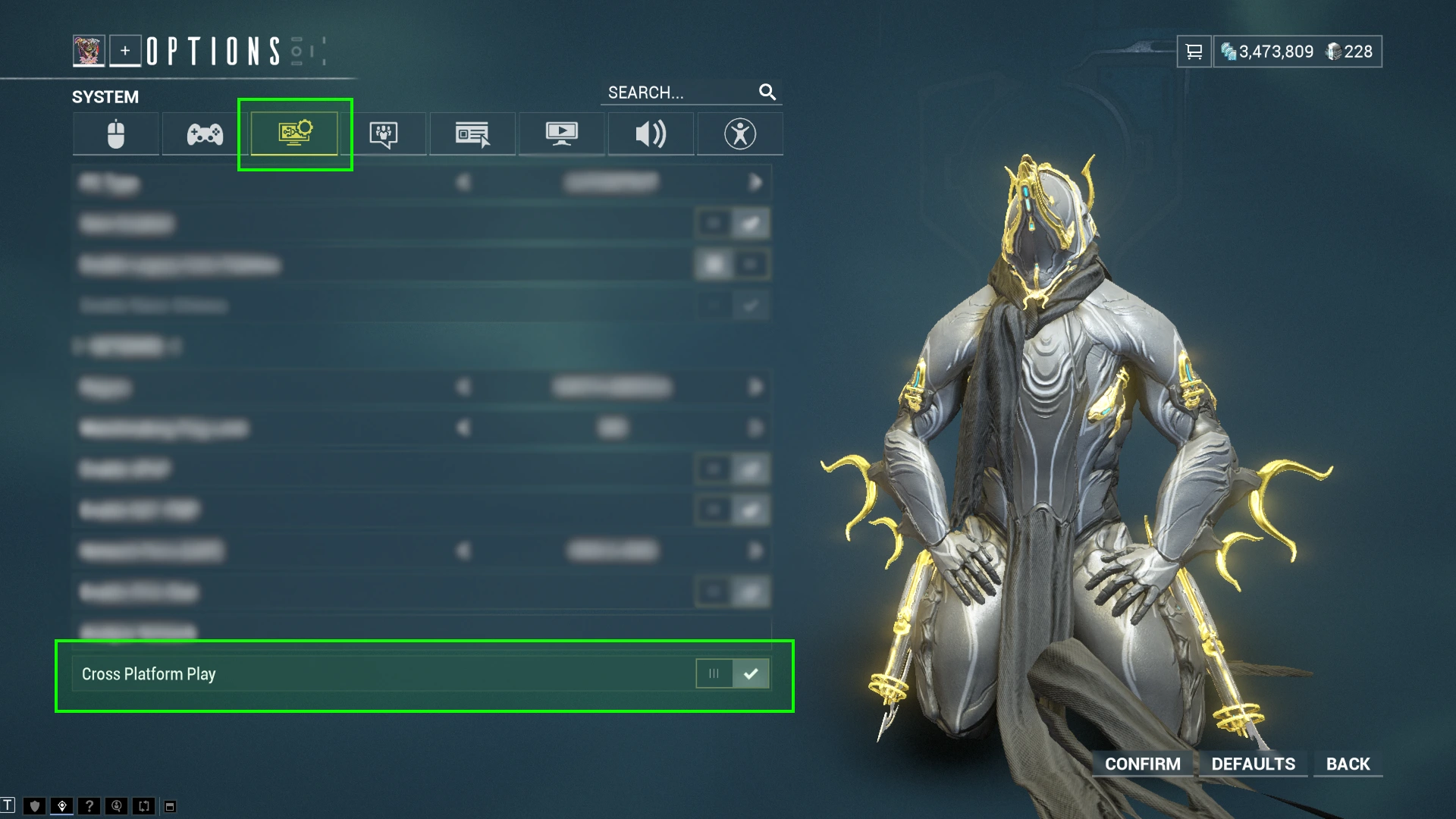
For a cross-platform Dojo meeting, load into the Dojo first, then invite your partner. If forming the squad beforehand prevents entry, use that order. Check the currency restriction before agreeing a Platinum price: Nintendo Switch Platinum cannot be traded between Switch and other platforms. You can still exchange eligible items across platforms.
Sources
Where this story comes from, and where you can check it.
Official sources
- WARFRAME SupportTrading FAQ & Safe Trading Tips ↗
- Digital ExtremesTrading Guide, FAQ, Tips, & Guidelines ↗
- Digital ExtremesWarframe TennoGuard Two-Factor Authentication FAQ ↗
- Digital ExtremesCross Platform Guide ↗
- Digital ExtremesUpdate 37: Koumei & the Five Fates ↗
- Digital ExtremesUpdate 44: Iceblade of Narin ↗
- Digital ExtremesCollect and Customize Guide ↗