To unlock characters in Apex Legends without paying, earn 12,000 Legend Tokens and use them to unlock your chosen Legend. New players should finish the Welcome Pass first: it unlocks Bloodhound, Gibraltar and Pathfinder, then awards enough tokens for one additional Legend of your choice.
This PC guide covers Season 30, Marked, launched on 4 August 2026, including Split 2 from 15 September. The unlock rules follow EA's support material checked on 5 October. A playable character during a trial or paid pass is not necessarily a permanent addition to your account.
Finish the Welcome Pass on a new account
New accounts start with Bangalore, Lifeline and Wraith. Open the Welcome Pass and choose an unfinished Welcome Challenge. EA's Welcome Pass guide lists tasks such as dealing damage with Ordnance, using healing items and looting care packages. Complete the displayed task, then check your progress before choosing the next one.
EA lists Ranked, Unranked and Bot Royale Evolved as modes for these challenges. You do not need Ranked access to begin: Unranked or the bot mode provides a route while competitive play is locked. Work through the pass to receive its three named Legends and the final 12,000-token reward.
If a returning account has no Welcome Pass, do not assume it is broken. Shockwave's original rules made the pass available to new accounts created after that season launched. Use the token-earning route below for an older account rather than expecting the onboarding rewards to appear again.
Save enough tokens for the character
EA says account levelling awards 600 Legend Tokens per level from Level 4 onwards, including at higher levels. At that rate, 20 token-paying level-ups provide 12,000 tokens if you spend none elsewhere. That is a calculation of rewards, not a promise about hours played or the exact account level of your first unlock.
Keep the currencies separate. Crafting Metals buy cosmetics and cannot craft a playable Legend. Legend Tokens cannot be bought in the Store, obtained from Apex Packs or gifted by another player. Opening more packs therefore does not directly fill the token balance needed for this route.
Tokens also pay for other things, including Legendary skin recolours and Daily Challenge rerolls. If a character is your priority, keep the unlock cost aside. PC Gamer's original currency guide identifies the same distinction between earned tokens and premium coins; its launch-era shop examples do not describe today's onboarding pass.
Check the offer before spending
EA's beginner guide gives the standard unlock prices as 12,000 Legend Tokens or 750 Apex Coins. Its FAQ places character unlocks in the Store. Check the offer for the actual playable Legend and the currency being charged before committing, especially if you want the earned-token option rather than premium coins.
Try the character in the Firing Range first. EA's Choosing Your Next Legend guide confirms that every Legend is available there, including ones you do not own. Practising their Tactical and Ultimate can help you choose where to spend your tokens; being selectable in the Range does not itself confirm ownership.
Separate permanent unlocks from paid access
A Legend Spotlight Pass is another paid route, purchased with Apex Coins. EA's FAQ says some passes include bonus Legend unlocks on purchase. Read the specific offer before buying: a pass reward skin and a playable-character unlock are different rewards, and a skin alone is not proof that you own its Legend.
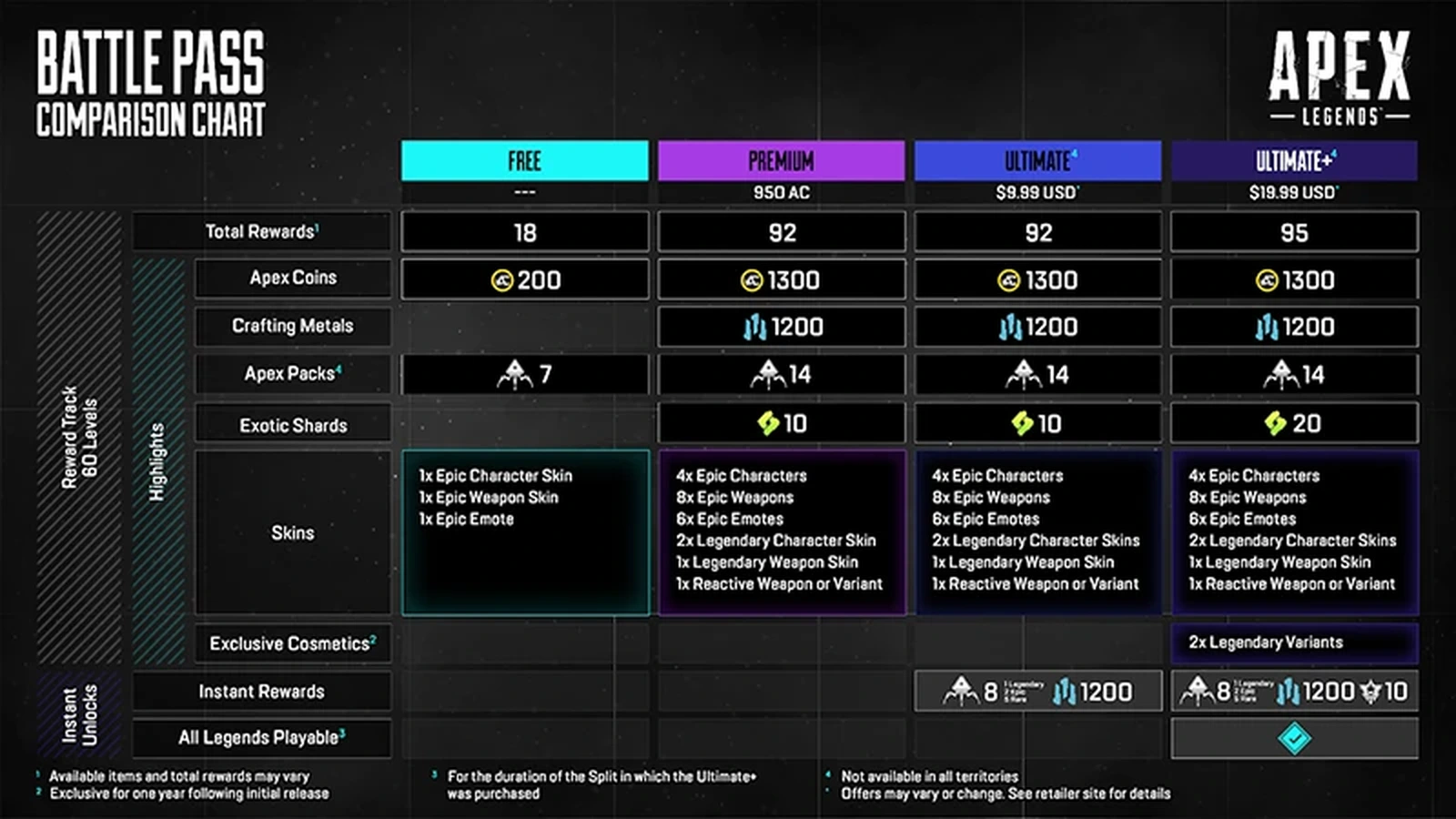
Ultimate+ Battle Pass access works differently. All Legends are playable for the duration of that Battle Pass split. Do not buy it expecting permanent ownership of the whole roster. If you want a character to remain available after the split, check whether you have separately unlocked them.
Confirm the unlock in the Legends tab
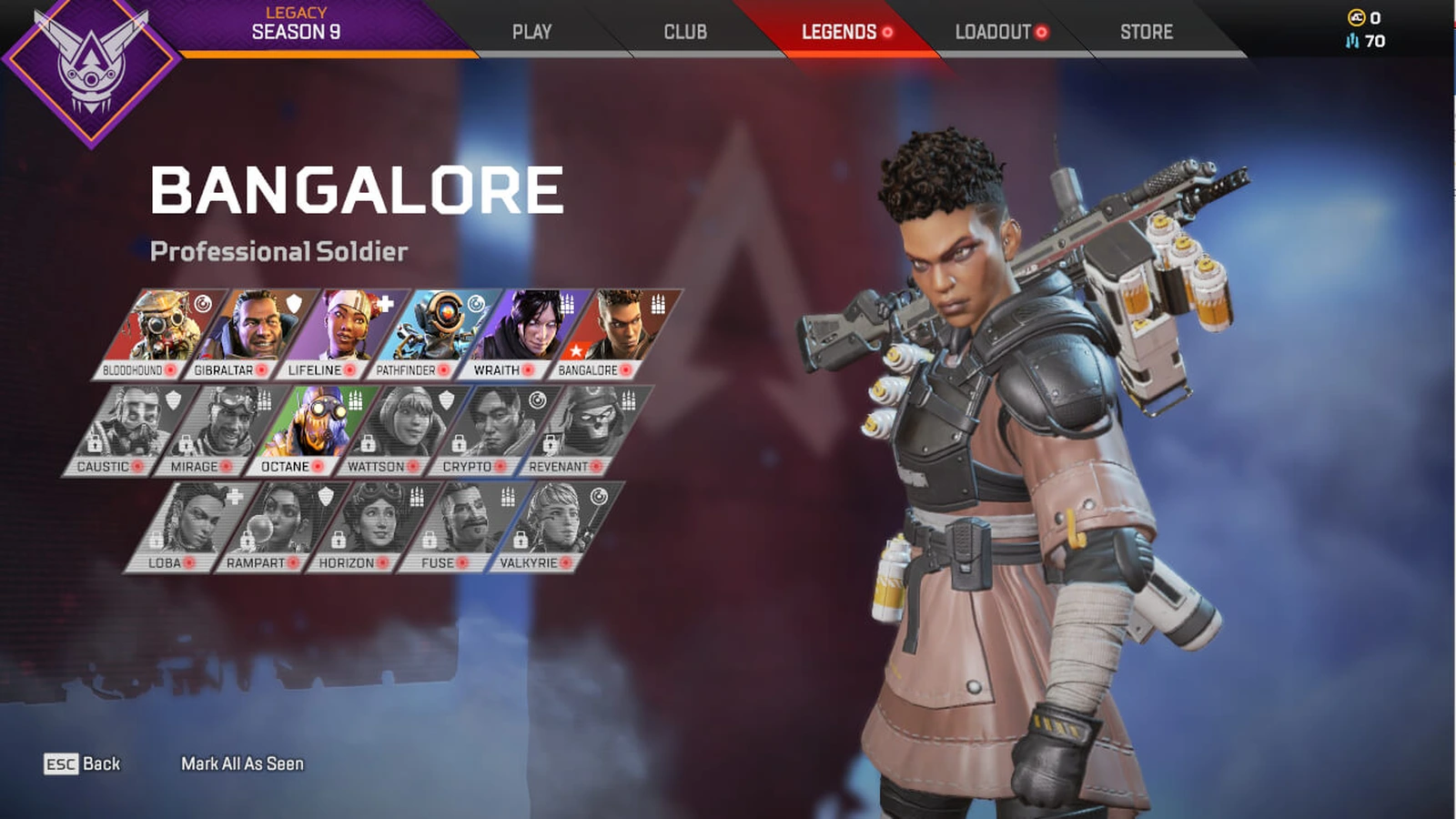
Newly acquired Legends appear in the Legends tab. Select the character there to use them in the lobby. If they are still missing, EA first advises checking that you actually spent the currency. Restart the game and PC, verify the EA Account you are using and check for server-status problems.
For content still missing after 24 hours, contact EA support with your platform username, the Legend's name, how you obtained them and the approximate time. Include proof of purchase if money was involved. These checks help identify missing content; they are not a verified fix for a missing confirmation button or a stuck challenge counter.
Sources
Where this story comes from, and where you can check it.
Official sources
- EA HelpHow to play Apex Legends as a beginner ↗
- Electronic ArtsWelcome Pass 101 ↗
- Electronic ArtsApex Legends: Shockwave Patch Notes ↗
- EA HelpApex Legends currency guide: currencies, crafting, and Apex Packs ↗
- Electronic ArtsApex Legends FAQ ↗
- Electronic ArtsChoosing Your Next Legend ↗
- EA HelpHow to get the Apex Legends Battle Pass ↗
- EA HelpApex Legends Legends guide: classes, abilities, and tips ↗
- EA HelpHow to find missing content in Apex Legends ↗
- Electronic ArtsApex Legends: Marked Patch Notes ↗
- Electronic ArtsApex Legends: Marked Midseason Patch Notes ↗