If your party is in a different phase in World of Warcraft: Forever, accept the invite, open the blue world refresh notice and choose Refresh Now from a safe spot. This is the flow in the 4 November 2026 launch version on Windows and Mac. An accepted invite puts you in the party. The refresh is the separate step that lets you meet the other players in the world.
Find the world refresh notice
Start with the character who has just accepted the invite. Look for the blue message about the world around you refreshing, beside a small arrow icon. The countdown tells you when the world around that character is due to change. Click the notice to open the confirmation window. Look for the words The world around you will refresh to identify the notice on your layout. Keep your current party open while you look for it.
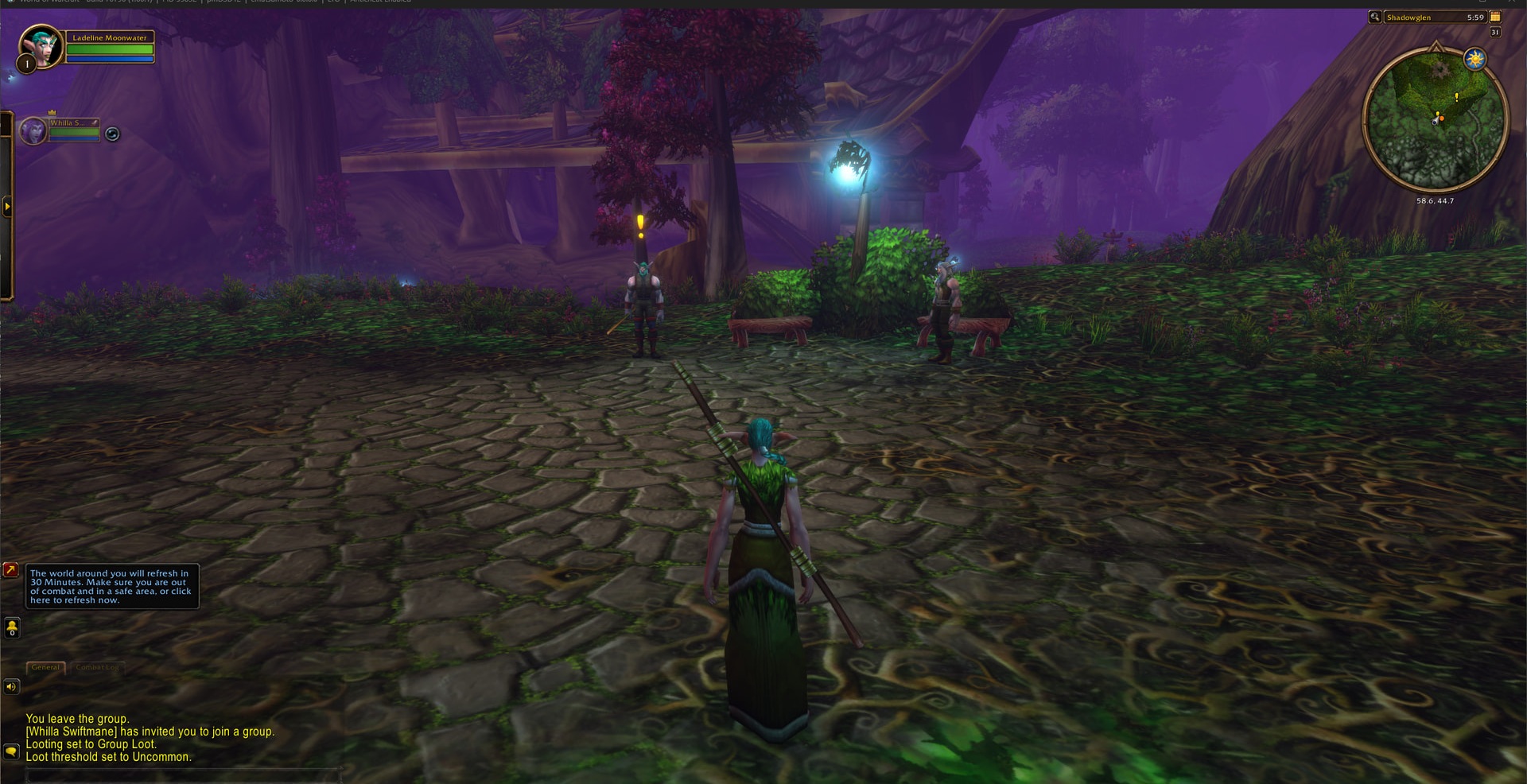
A phase is a copy of the area you're standing in. Your party can be together in the group interface while its members are still looking at different copies of the same road or town. Agree on one nearby landmark in party chat so you can tell the difference between being in another phase and simply standing at opposite ends of the area.
Refresh once you're out of combat
Finish your fight and move somewhere safe before choosing Refresh Now. The next copy of the area can have enemies where you just cleared them, so step away from spawn points before switching. The confirmation window has both Refresh Now and Okay. Use Refresh Now when you're ready to move immediately. If you still need to reach safety, use the time shown in the notice to move first. Check your surroundings again as soon as the new copy of the area loads.
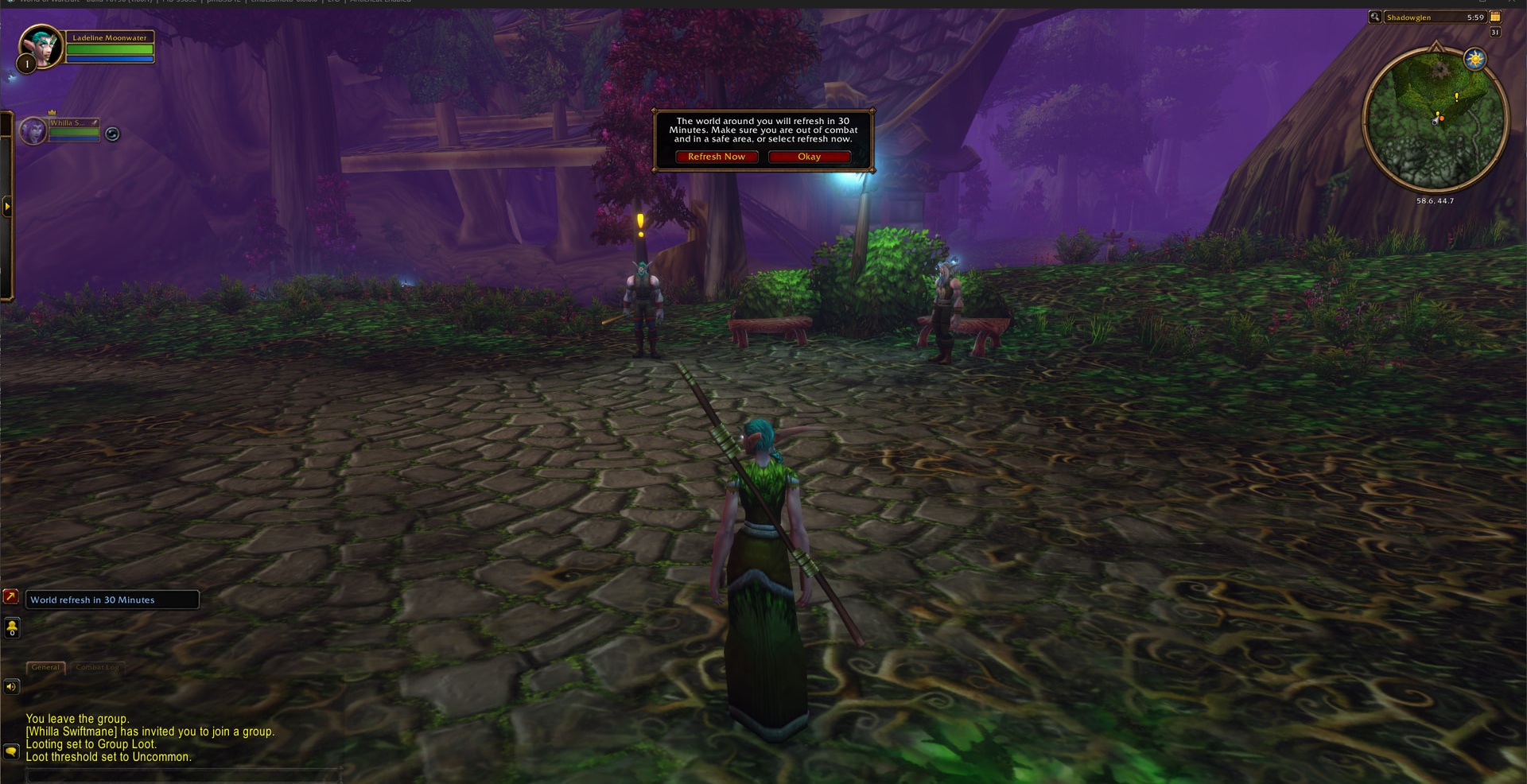
After the refresh, meet at the landmark you agreed on and look for your friend's actual character in the world. Check that you can see each other up close before pulling a quest enemy or setting off for a dungeon. The party portrait tells you who accepted the invite, while seeing the character standing next to yours tells you that you're sharing the area.
Check where the process stopped
If you're grouped and the notice is missing or the refresh leaves you separated, compare your locations in party chat and check again at close range. The 6 November hotfix improved player visibility over longer distances, so check from the same spot before treating a missing character in the distance as another phase mismatch. For a persistent mismatch, use Blizzard's WoW Forever Bug Report forum. Include the zone, whether the blue notice appeared, and what happened after you selected Refresh Now.
If the invite itself fails, compare the two characters' rulesets and factions first. Open-world parties require the same ruleset and faction, so a Normal character and a PvP character need compatible characters before they can quest together. Use an existing character that matches both choices, or create one together. For example, two Horde characters can group on Normal, while a Horde Normal character and a Horde PvP character live in separate rulesets. You can keep your own interface preset. Our breakdown of rulesets and visual presets explains which choices you can make independently.
For a friend who entered with an Invite-a-Friend launch code and hit a restriction on forming parties, have that player log out of WoW: Forever and back in, then try the invitation again. Blizzard issued a hotfix for that restriction on 5 November. Once the invite goes through, use the world refresh only if you still need to bring the characters into the same phase.
Sources
Where this story comes from, and where you can check it.
Official sources
- Blizzard EntertainmentPhasing issues with group still persist from beta ↗
- Blizzard EntertainmentWatch the WoW: Forever Podcast: All About Tech ↗
- Blizzard EntertainmentChoose Your Ruleset in World of Warcraft: Forever ↗
- Blizzard EntertainmentIssues Resolved for Invite-a-Friend Players ↗
- Blizzard EntertainmentNew Player's Starter Guide: Welcome to World of Warcraft: Forever ↗
- Blizzard EntertainmentWoW: Forever Hotfixes - November 6, 2026 ↗