If your Factorio space platform is not requesting items, open the hub's request and check its import location, then enable Automatic requests from space platforms at the supplying rocket silo. On 2.1, also check whether the request accepts deliveries from the planet: a Platforms-only request asks other ships for goods.
These checks cover Space Age on Windows, macOS, Linux and Nintendo Switch 2. The expansion requires the free Switch 2 Edition upgrade; it is unavailable on the original Switch. Check your installed version: the mixed-cargo and source-selection controls below require 2.1, which became stable on PC on 23 October 2026. The current PC stable build is 2.1.24, released on 27 October.
Match the request to the supplying planet
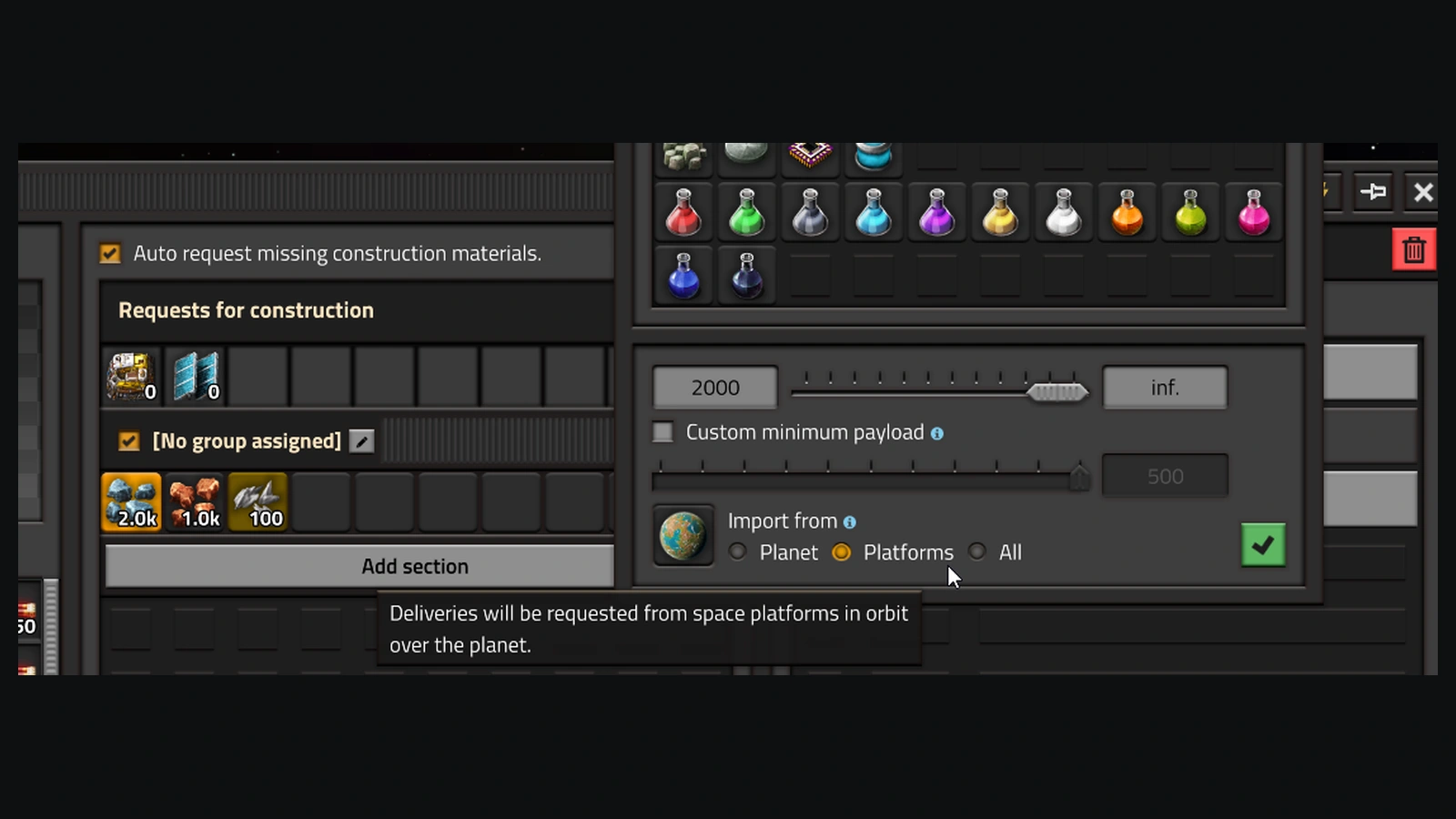
Open the space platform hub, select the item in its requests and inspect Import from. Set the planet whose factory should supply that item. Keep the platform in orbit above that planet while receiving its rocket deliveries. A request assigned to Vulcanus needs its Vulcanus supply route, even when the same item is sitting in storage on Nauvis.
On 2.1, choose Planet to receive goods from ground-based rocket silos, or All to allow both silos and other platforms. Choose Platforms when you specifically want another orbiting platform to supply the item. For supplies you want to collect anywhere, such as repair packs, leave the Import from location blank: on 2.1, that means all locations.
Enable the silo and read the request status
Open the rocket silo on the supplying planet and enable Automatic requests from space platforms. Supply the requested goods through that silo's local logistic network. The checkbox lets the silo request them from that network; stock elsewhere in your factory still needs to reach the supplying network.
Hover the platform request and follow its status. No rocket silos accepting automatic requests from space platforms points you back to the silo setting. Not enough space in the space platform hub points to the destination inventory: make room there before expecting another delivery. Check that the silo has a ready rocket as well as goods to load.
Lower the minimum for a small delivery
For Not enough to fill one rocket, reopen the item request on the platform. Enable Custom minimum payload and lower it to an amount you can supply and are happy to send. This changes the minimum carried by one rocket; keep the request's desired stock amount set to what you actually want aboard.
On 2.0, automatic deliveries normally wait for a full rocket carrying one item type. On 2.1, automatic rockets can combine different requested items. A small construction order can therefore share a launch with other goods. Use the minimum override for a remaining small delivery rather than increasing every request to a full rocket-load.
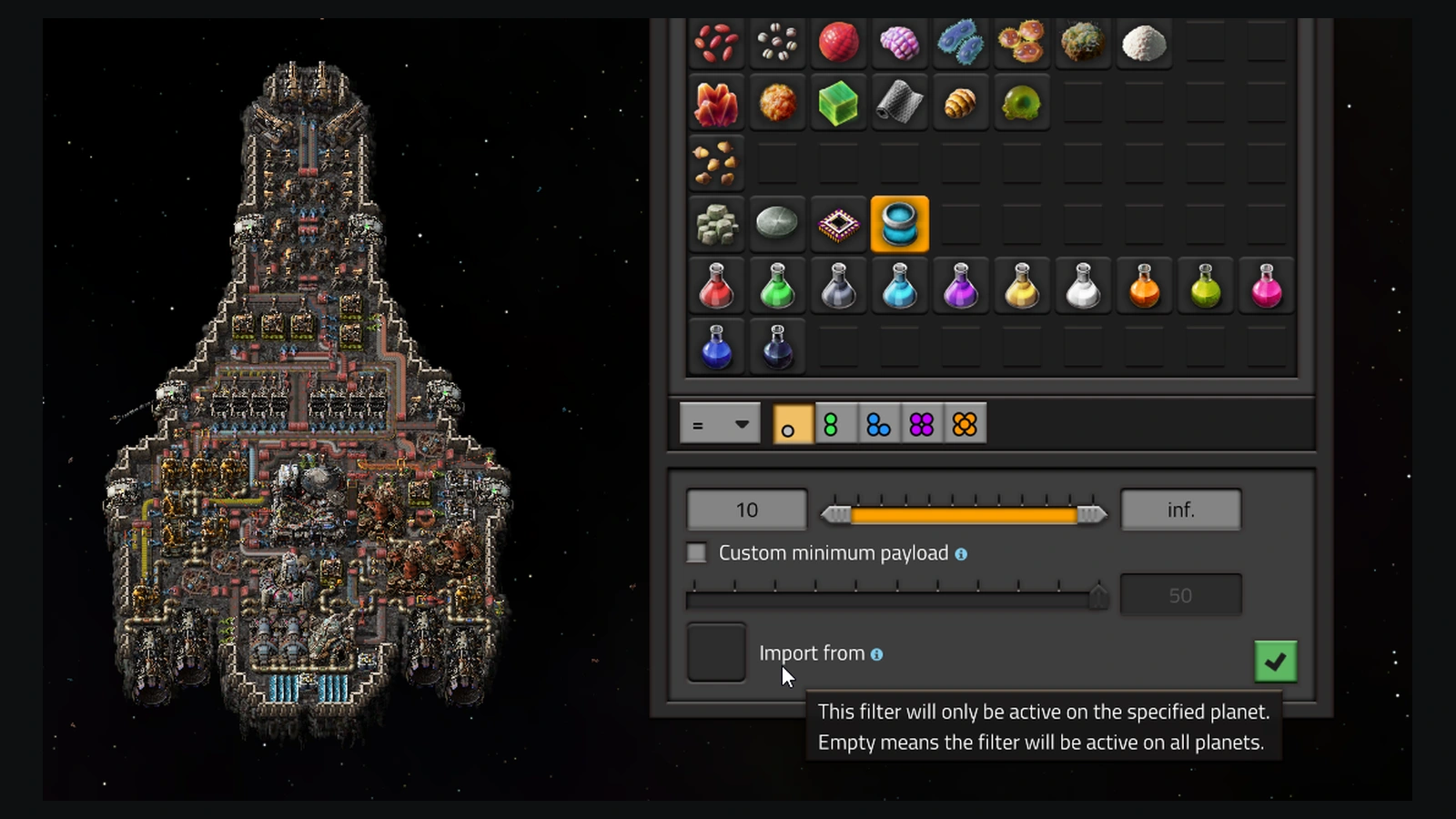
With the override active on 2.1, the silo requests as much as it can, capped by the requested quantity or available network stock. Let robots already carrying cargo finish their deliveries: launch waits until the minimum is met and no more robots are on their way. A lower threshold can get supplies moving sooner, at the cost of accepting a less fully loaded rocket.
Check the delivered stock before departing
On an older 2.1 experimental build, update for the minimum-payload fixes introduced in 2.1.18 on 16 September 2026. That release made mixed rockets respect custom minimums and fixed requests failing to order extra items when the minimum equalled the requested amount. Before moving a 2.0 save to 2.1, back up saves and blueprints: updated copies cannot be downgraded.
Watch the cargo arrive, then check the requested item's quantity in the platform hub. Confirm receipt there before setting off. Once your supplies are aboard, follow the separate planet travel and landing steps to take your character to the destination.
Sources
Where this story comes from, and where you can check it.
Official sources
- FactorioFriday Facts #441 - Space logistics improvements ↗
- FactorioFriday Facts #449 - 2.1 Stable ↗
- FactorioFriday Facts #382 - Logistic groups ↗
- Wube Softwarefactorio-data: changelog.txt (2.1.24) ↗
- Wube SoftwareFactorio 2.1.24 (headless distribution) ↗
- FactorioFactorio - Nintendo Switch 2 Edition out now! ↗