To find the multiplayer leaderboards in Battlefield 6, open Profile from the main menu and select the Ranked badge on the left. That opens the Ranked Hub. Look for the Career, Game Modes and Classes boards, then use the Sticky Player Row to see your position. The boards arrived in the Casino Heist update (2.1.2.0) on 10 November 2026 and are available on PC, PS5 and Xbox Series X|S.
Open the Ranked Hub from Profile
Look beneath the career totals on the left of your Profile for the badge under Ranked. Select the badge itself to open the hub. If you have opened View All Stats, go back to Profile and use the badge instead. Your profile totals are your own record, while the new boards let you compare your standing with other players.
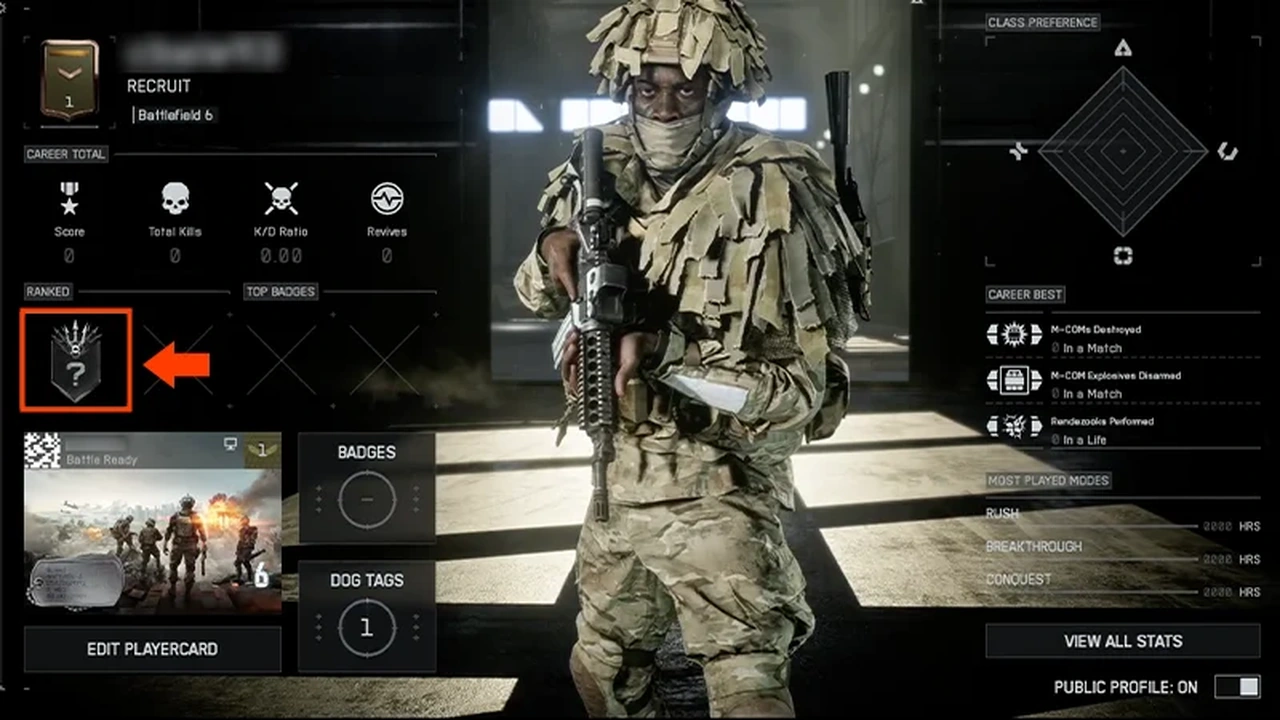
Once inside, look for the multiplayer categories. If you see an Elite Top 250 list, you are looking at REDSEC Ranked Battle Royale. That list ranks the leading players on each platform by Ranked Points. For your regular multiplayer standing, look for Career, Game Modes or Classes.
Choose the board and find your position
- Choose Career for the broad multiplayer comparison.
- Choose Game Modes to see how you stand in the mode you play.
- Choose Classes to compare your standing for the class you use.
Use the Seasonal Filter to check which season you are viewing. Season 5 is the first season available in this filter, so start there if you are looking for your standing after the Casino Heist update. If you are comparing numbers with someone else, use the same category and season before comparing positions.
Find your entry in the Sticky Player Row instead of scrolling through the top names. It shows your overall position for the category and season you selected, even if you are well outside the leading places. When you switch boards, read your position again. Your standing on one class board answers a different question from your standing in a game mode.
Compare with your friends
Turn on Friends-Only to narrow the board to your friends. Keep the category and season the same when you switch the filter, so you can compare within your group using the same numbers. Turn it off when you want to see the wider leaderboard again.
If comparing classes sends you back to your loadout, check how to unlock attachments for the base weapon before swapping to a different Weapon Package.
Sources
Where this story comes from, and where you can check it.
Official sources
- Electronic ArtsBATTLEFIELD 6 GAME UPDATE 2.1.2.0 ↗
- Electronic ArtsBattlefield 6 - Community Update - High Stakes in the Casino ↗
- EA HelpBattlefield 6 REDSEC Ranked: progression, ranks, rewards ↗
- Electronic ArtsBattlefield 6 FAQ ↗