If RimWorld 1.7 opens to a black screen, verify the installed files in Steam, then return to the default public version if the beta still fails. Keep your existing colony intact while you check. The 1.7 test moves the game from Unity to Ludeon's Waylith engine, so start by confirming which version you actually launched.
Check that you are running the beta
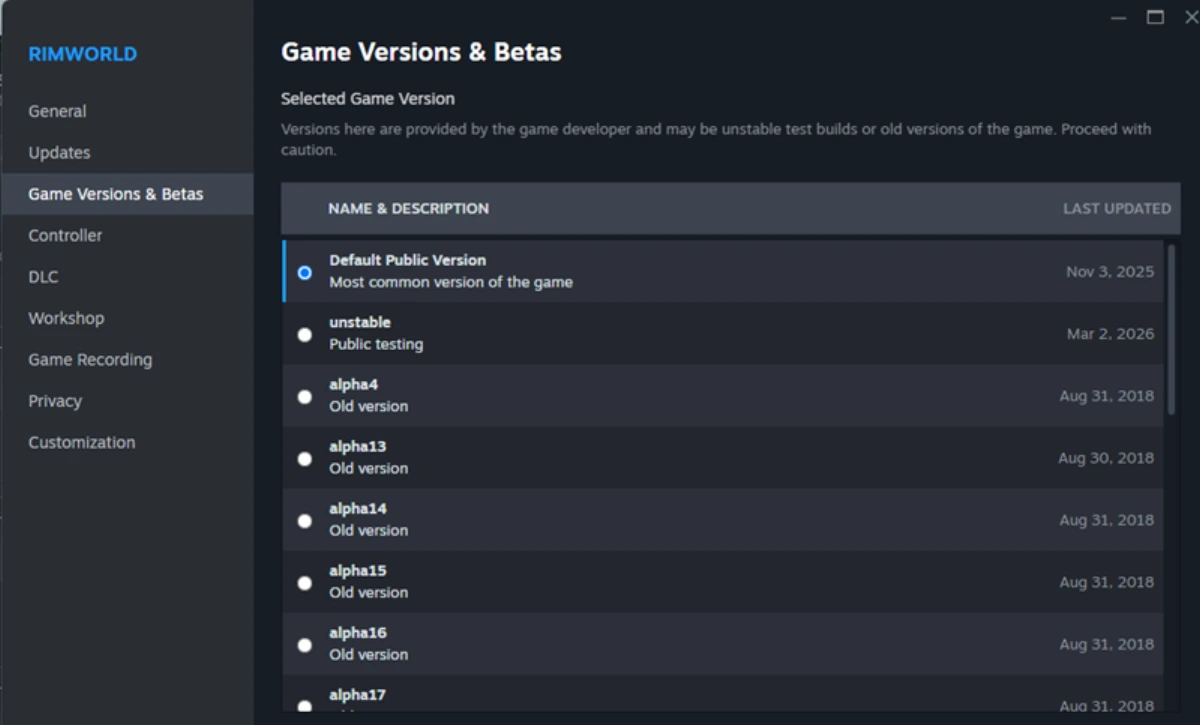
Right-click RimWorld in your Steam Library and open Properties, then Game Versions & Betas. Look at Selected Game Version. Ludeon's instructions call this the Betas tab and name the test branch unstable. Choose that branch only if you intend to test 1.7. If Steam offers a launch choice, select Play 1.7 Unstable. Restart Steam if the game does not automatically update after your branch selection.
Write down where the failure happens before changing anything else. A black screen before the main menu, a menu that opens but cannot load your colony, and a failure after loading a particular mod list are different results. Keep the branch name, game version and any error message together. This gives you a useful comparison after the file check, instead of treating every unsuccessful launch as the same fault.
Verify the installed files
Close RimWorld and save any other work before restarting your computer. Open Steam, right-click RimWorld in the Library and select Properties. Open Installed Files and click Verify integrity of game files. Let Steam finish the check before launching again. Valve recommends this check for crashes and missing content; use it to check the installation before moving on to a different version of the game.
Run one game's verification at a time, and avoid starting a virus scan or other demanding system task alongside it. The check can take several minutes. Valve also notes that some local configuration files can fail verification because they should remain unchanged. A failed-file message alone is therefore not a reason to delete your settings. Start RimWorld again and record whether you can reach the main menu and load your intended colony.
If verification gets you to the menu but the screen turns black only when you load a colony, include that distinction in your report. Keep the original save and its mod list available. Test a separate new colony if the menu responds; leave your existing colony untouched. Report whether both fail, rather than replacing files repeatedly after a successful installation check.
Return to the default public version
If the beta still leaves you at a black screen, close the game and return to Properties > Game Versions & Betas. Select Default Public Version instead of unstable, then let Steam replace the installed branch before trying again. In Ludeon's 12 October announcement, the main branch remains on 1.6 while 1.7 is tested separately. Check the version you reach after the download; the branch selection changes the installed build.
Ludeon says saves work in both directions between 1.6 and 1.7. Keep a separate copy of your working colony before testing further changes, and retain the mod list it used. A yellow potentially unsupported mod warning can simply reflect the changed version number. Treat the actual loading result as the useful check: record whether the menu opens and whether the same colony resumes after returning to the public branch.
Report a beta that still will not start
Ludeon warns that PCs more than ten years old may be unable to run 1.7. Send unresolved beta launch problems to the official RimWorld development Discord linked in its announcement. Include your operating system, graphics hardware, branch, version, error message and the results before and after verification. Say whether returning to the public branch lets you play again. Continue on the working version while the beta problem is investigated.
Sources
Where this story comes from, and where you can check it.
Official sources
- Ludeon StudiosAnnouncing the Waylith Engine and Update 1.7 ↗
- SteamworksBranches (Betas) ↗
- Steam SupportVerify Integrity of Game Files ↗