If Project Zomboid Build 42 multiplayer stops working after an update, compare the full version number on the host's main menu with the one on each friend's copy. Steam moved the default branch to 42.22.2 on 9 November. A group split between that build and 42.21 needs to agree on a version before anyone tries to join again. These steps are for Steam groups that start their world through the game's Host menu.
Match the host's build in Steam
Ask the host to quit to the main menu and read out the full build number. Compare all the digits on each player's copy. If the game shows a different-version message when someone joins, fix that mismatch first. Two copies can both be on Build 42 and still differ. For a group moving forward together, quit the game and right-click Project Zomboid in your Steam Library. Open Properties, select Game Versions & Betas, then choose Default Public Version.
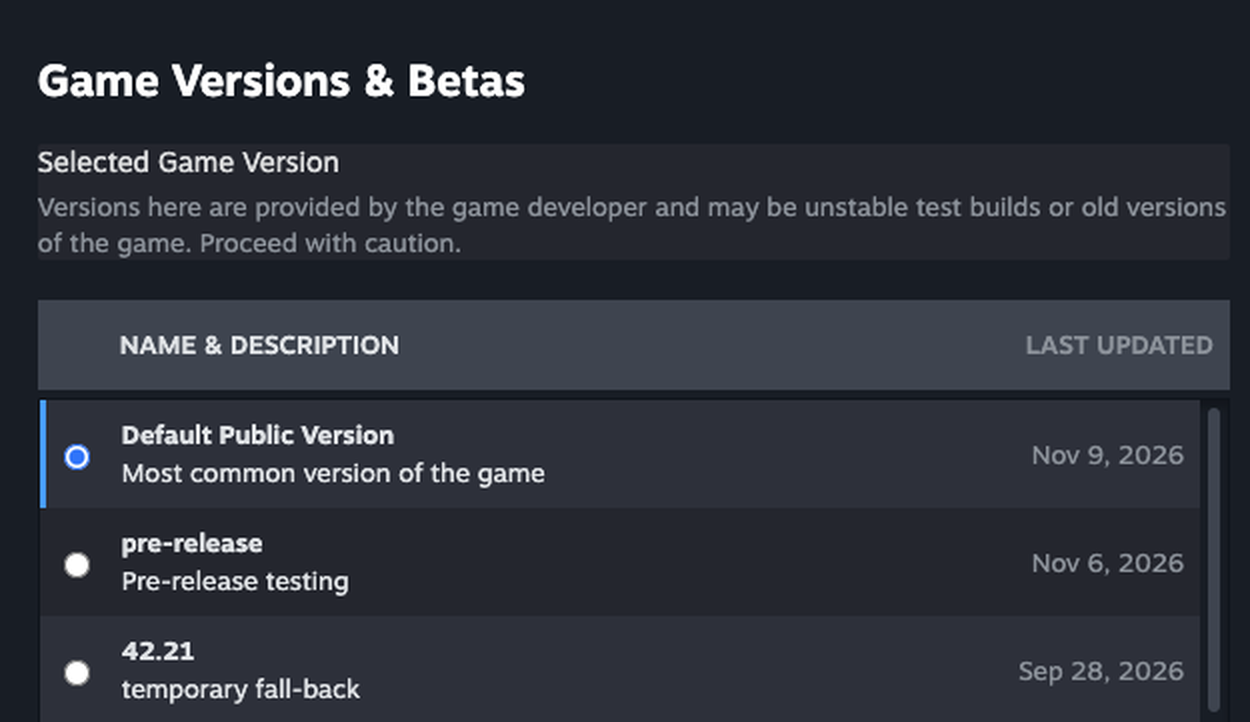
Let Steam finish downloading before you launch again. Have the host and one friend compare their numbers, then try a fresh invite once the host has spawned. If that friend joins and the rest still see the version message, have each of them repeat the same check. You can leave the world's settings alone while you sort out who has received the update.
Try a separate world if the builds match
If everyone is on the same build and the old world still hangs or rejects an invite, use a new world to check whether you can connect at all. On the host's main menu, choose Host, then Manage Settings and Create New Settings. Give the test settings a fresh name and leave out Workshop items and mods. For this test, launch with mods off on both copies. Keep the original world and its settings available for when you finish.
Spawn in the test world and invite one of the friends who had trouble. If they spawn too, the pair can connect on this build. Check whether the mods your existing world needs have updates for the version you just tested, and keep that world backed up before reopening it. If the test fails as well, note whether the host can spawn and where the guest gets stuck. Include the full build and those details when you report the unmodded failure to The Indie Stone.
Keep your old save if you return to 42.21
If an essential mod still needs 42.21, agree on the rollback before anyone switches. Close the game and keep a separate copy of the group's world from before the conversion. Use a known 42.21 copy for the older build and keep the converted 42.22 world separately. Any progress made after conversion stays with that newer copy. For a save converted via Continue or Load, look for the copy with _backup appended that the game creates alongside it. For your hosted world, use the backup the host made before updating.
In Steam, return to Game Versions & Betas and choose 42.21, shown as the temporary fallback in The Indie Stone's release notes. Have everyone who will join the host make the same change and compare the numbers again. If you have no pre-update copy, keep your existing world on the current build and use a separate fresh world to try 42.21. When you're ready to move forward together, select Default Public Version again and let Steam finish the update before sending a new invite.
Sources
Where this story comes from, and where you can check it.
Official sources
- The Indie Stone42.22.2 STABLE Released ↗
- The Indie StoneRe-population of the Dead: Build 42.21 Unstable Released ↗
- The Indie Stone[42.20.0] Manage server settings fails to create settings ↗